Managing Absence Reasons
Every absence in TransMaS is recorded against a reason - annual leave, sickness, or anything else you need to track. The list of reasons is your company's own: you decide what is on it, which reasons count against the yearly leave allowance, and which ones drivers can pick when requesting leave from the app.
Where to find it
Go to Settings, then under General Settings select Absence Reasons. You can also reach it from the Reasons tab on the absence screens. You need the Absence Reasons permission - ask your administrator if you cannot see it.
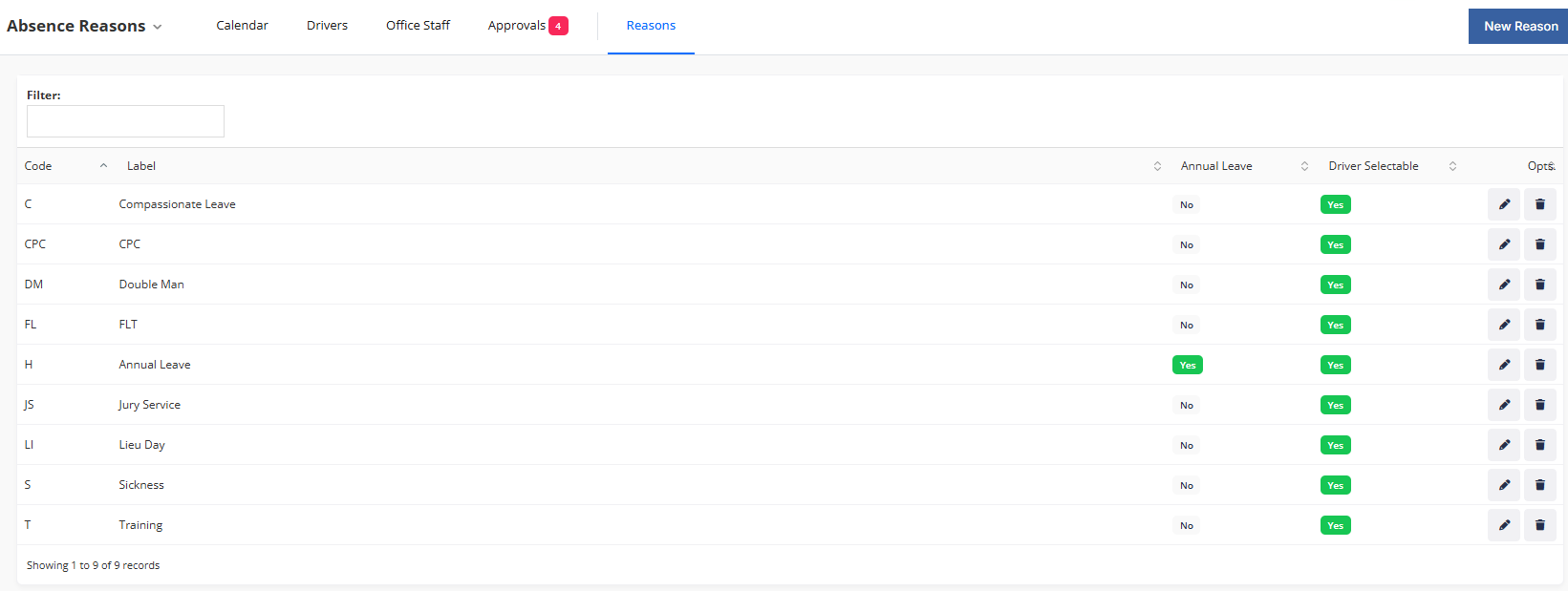
Creating a reason
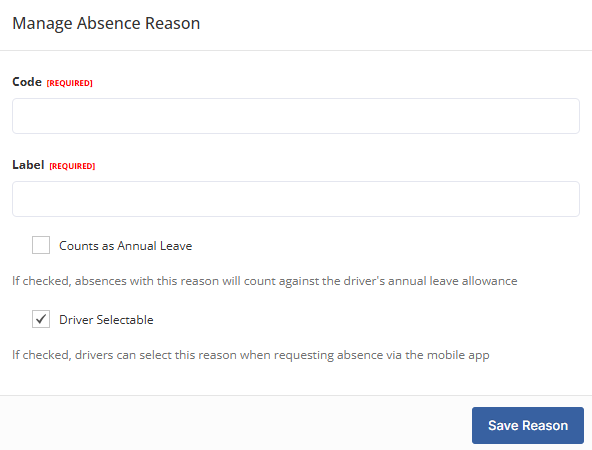
- Click to add a new reason.
- Enter a Label - the full name shown on screens and in emails, for example Annual Leave or Sick Leave.
- Enter a Code - up to five capital letters, for example H or SICK. This is what appears in the small calendar and roster cells, so keep it short and recognisable. Each code can only be used once.
- Tick Counts as Annual Leave if absences with this reason should be deducted from the person's yearly allowance. Leave it unticked for sickness, unpaid leave and anything else that should not use up holiday.
- Tick Driver selectable if drivers should be able to choose this reason when requesting leave from the app. Reasons like Suspension would normally leave this off.
- Save.
What happens next
- The reason appears immediately in the add absence window and, if driver selectable, in the driver app.
- Its code shows on the absence calendar and the driver roster wherever an absence uses it - hovering shows the full label.
Editing and archiving
Open a reason from the list to change its label, code or settings. Changes apply everywhere, including absences already recorded with that reason.
Reasons you no longer use can be archived. An archived reason cannot be picked for new absences - in the office or from the app - but absences already recorded with it keep it and display as before. Reasons are never deleted outright, so your history always stays intact.
Common questions
Why has a driver's Available figure not gone down for their sickness? Only reasons with Counts as Annual Leave ticked are deducted from the allowance. Sickness normally should not be, so that is usually correct.
A driver says a reason is missing in the app. Check the reason has Driver selectable ticked and has not been archived.
Can I delete a reason completely? No - archive it instead. That keeps every past absence displaying correctly while removing the reason from the pickers.
Can two reasons share a code? No - codes must be unique so the calendar and roster stay unambiguous.
What happens if I rename a reason? The new label shows everywhere straight away, including on past absences. If the old meaning should be preserved, archive the old reason and create a new one instead.
Related
- Managing Driver Absences - adding and viewing absences.
- Requesting an Absence from the App - where driver selectable reasons appear.