7. Driver & Resource Management
Part 7 of 8: Getting Started with TransMaS
This article is part of a series designed to take new users through the full lifecycle of an order.
In this article: We look beyond individual jobs to the core resources and people behind them—managing driver rosters, tracking trailer locations, and monitoring vehicle and license expiry dates.
7.1 Driver Management
Auto-scheduling in TransMaS populates your scheduler several days in advance based on your Shift Patterns, Absences, and Subcontractor settings. Because these are generated ahead of time, new setting changes may not appear on the scheduler immediately; if you need to add a schedule right away, simply use the + Create button at the top of the screen to generate one manually.
- Shift patterns: By defining a rotation (e.g., a standard 5-on/2-off or 4-on/4-off), the system automatically generates the driver's working schedule.
- Create the Pattern: In Settings > Shift Patterns, define your rotation length and designate each day as "Days," "Nights," or "Off."
- Assign to Driver: Open a driver's profile under Settings > Drivers, go to the Roster Settings tab, and link them to your new pattern.
- Full details: Managing Shift Patterns
- Absences: Tracking absences prevents the system from auto-generating shifts for drivers who are off.
- How to Add: Use the + Create > Absence button. You can select specific reasons (e.g., Annual Leave) and "Force delete" existing schedules to clear a driver’s slate instantly.
- Allocations: To set a driver’s annual holiday allowance, navigate to their Driver Profile > Absence Totals tab. Note that carry-forward days and paid totals should be updated manually each year.
- Full details: Managing Driver Absences
- The Driver Roster is your centralized weekly planning view, combining shift patterns, absences, and real-time availability into one screen to ensure your schedules are accurate.
- What it shows: You can see active shifts (Green for Days, Blue for Nights), overtime (Yellow), and absences (Grey). Clicking a shift day allows you to view the driver's specific work for that day.
- Full details: Using the Driver Roster
- Driver Expiry Dates: Maintaining valid licenses and certifications is critical for compliance. TransMaS provides a simple way to track these dates.
- You can track HGV, CPC, and Tachograph dates by default in the Licenses tab of the Driver Profile.
-
When a driver has an upcoming or overdue expiry date, a red "Dates" warning will appear on their schedule line in the scheduler. To see details, simply hover over the text.
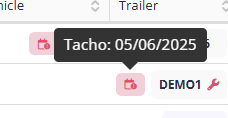
- Full details: Driver Expiries
7.2 Vehicle and Trailer Management
- Managing Vehicles & Trailers: Vehicles and trailers are managed as distinct assets in TransMaS. While they function similarly, they are stored in separate menus.
- Navigate to Settings > Vehicles (or Trailers) to add new assets or modify existing ones.
- Maintenance & Expiry Dates: In the asset profile under the Dates tab, you can track MOT, Road Tax, Service, and Insurance dates. Ensure the Req? box is ticked for any date you want the system to monitor. When a vehicle or trailer has an upcoming or overdue expiry, a spanner icon appears next to the asset on the Scheduler. Planners can hover over this icon to see exactly which service or inspection is due.
- Assigning to a driver: Go to a driver's profile in Settings > Drivers, and then open the Allocations tab to set vehicle or trailer allocations. This will assign the vehicle &/or trailer to the driver in their daily schedules.
- Full details: Managing Vehicles & Trailers
- Trailer Tracking: Accessed via the Scheduling menu in the sidebar, the Trailer Sheet allows you to maintain visibility of your fleet assets. It tracks where trailers were last dropped by drivers, reducing time spent hunting for equipment.
7.3 Products & Containers
Beyond drivers and vehicles, TransMaS stores the specific details of the cargo you move..
- Products: Every order requires a product to be attached. You can manage your master list in Settings > Products.
- At a minimum, each product needs a Code, Name, and Unit of Measure.
- For specialized haulage, you can store dimensions, ADR details, Waste Codes, and TASCC status.
- Containers: If your operation involves shipping containers, you can manage them in Settings > Containers.
7.4 TransMaS Plus (Optional Add-on)
TransMaS Plus is an optional upgrade for driver and resource management, unlocking additional tools for walk-around checks and absence management.
- Digital Walkarounds & Faults: Replace paper pre-start checks with digital checklists. Drivers report defects via the app, and transport managers receive instant notifications to review and action faults.
- Advanced Absence Management: Manage holiday requests and sickness for both drivers and office staff in one place. Drivers can request leave via the app, which managers can then approve or reject with a single click.
- Learn more about TransMaS Plus
Next Step: Finally, explore the customer portal, reporting, how to reach our team when you need a hand. Continue to Part 8: System Extras & Support